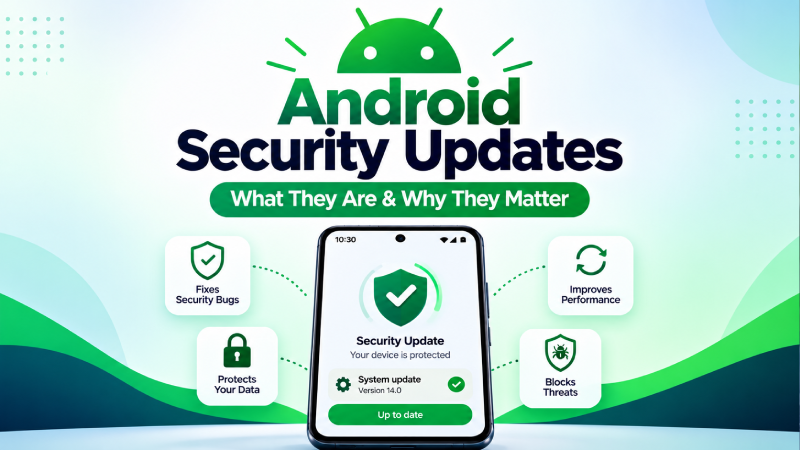
Android security updates help protect smartphones and tablets against security vulnerabilities that could affect the operating system, apps, device components, and user data.
Unlike major Android version upgrades, a security update may not introduce noticeable features or change the appearance of your phone. Its primary purpose is to fix security issues and strengthen the device against potential attacks.
Keeping your Android device updated is therefore an important part of mobile security, alongside using trusted apps, reviewing permissions, and keeping Google Play Protect enabled.
What Is an Android Security Update?
An Android security update is a software update that includes fixes for security vulnerabilities affecting Android devices and related components.
Google publishes Android Security Bulletins describing vulnerabilities and the security patch levels that address them. Device manufacturers can then incorporate the applicable fixes into their own software updates.
Security updates can address vulnerabilities involving different parts of the Android platform, including system components, media, frameworks, libraries, and other device software.
Some vulnerabilities can have serious consequences if successfully exploited. For example, Android’s September 2026 security bulletin documents vulnerabilities that could potentially allow remote code execution or elevation of privilege on affected devices.
What Is an Android Security Patch?
An Android security patch is a collection of security fixes released to address known vulnerabilities.
You may see a date such as:
Android security update: September 5, 2026
This date is known as the device’s security patch level.
The date does not mean that your phone received a new Android version on that day. It indicates the security fixes represented by that patch level.
Android Security Bulletins can contain multiple patch levels. For example, the September 2026 bulletin lists both September 1 and September 5 security patch levels.
Why Are Android Security Updates Important?
Security updates matter because software vulnerabilities can provide opportunities for attackers to compromise devices.
Depending on the vulnerability, successful exploitation could potentially result in:
- Unauthorized access to device resources
- Information disclosure
- Elevation of privileges
- Remote code execution
- Other security or privacy problems
Android’s security model includes multiple layers of protection, but keeping the operating system updated helps ensure that known vulnerabilities are addressed.
Google’s Android Security Bulletins recommend updating to the latest available Android version where possible.
Android Security Updates vs Android Version Updates
These two types of updates are related but not identical.
Android Version Update
A major Android version update can introduce:
- New features
- Interface changes
- Performance improvements
- Privacy controls
- New system capabilities
- Security improvements
For example, moving from one major Android release to another is an Android version upgrade.
Android Security Update
A security update focuses primarily on fixing security vulnerabilities and improving protection.
It may not noticeably change the interface or add major features.
This means a phone can remain on the same Android version while receiving newer security patches.
What Is the Android Security Patch Level?
The Android security patch level tells you the date associated with the security fixes installed on your device.
You can use it to determine whether your phone is running an older security update.
Google’s Android documentation says you can find the Android version, Android security update, Google Play system update, and build number from the Android version section of Settings.
For example, you might see:
Android version: Android 17
Android security update: September 5, 2026
Google Play system update: August 2026
These are different pieces of information.
How to Check Your Android Security Update
The exact menu can vary between manufacturers, but Android provides a standard way to check your software information.
Step 1: Open Settings
Open the Settings app on your Android phone.
Step 2: Open Android Version Information
Go to:
Settings → About phone → Android version
You can find information such as:
- Android version
- Android security update
- Google Play system update
- Build number
Google documents this path in its Android Help guidance.
Step 3: Check for a New Update
To check for available system updates, go to:
Settings → System → Software updates
The exact wording may differ depending on your phone manufacturer.
Google notes that update schedules and menu locations can vary by device, manufacturer, and carrier.
How to Install an Android Security Update
If an update is available, your phone normally displays a notification.
You can also manually check through your device’s software update settings.
Before installing a major update, Google recommends connecting to Wi-Fi and charging the device to at least 75 percent.
A typical process is:
- Open Settings.
- Select System or Software update.
- Check for available updates.
- Download the update.
- Follow the instructions on the screen.
- Restart the device if required.
Do not interrupt the installation once the update process has started.
Why Does My Android Phone Have an Older Security Patch?
Seeing an older security patch does not necessarily mean that your phone is broken.
Android updates are distributed through device manufacturers and, in some cases, mobile carriers. Google states that update schedules vary by device, manufacturer, and carrier.
Possible reasons include:
- The manufacturer has not released the update for your model yet.
- Your carrier has not approved or distributed the update.
- Your device has reached the end of its supported update period.
- The update is being distributed gradually.
- Your phone requires a restart or additional storage before updating.
- The device is running software that is no longer eligible for newer updates.
If your phone is consistently missing security updates, check the manufacturer’s official support information for your specific model.
What Happens When a Phone Stops Receiving Security Updates?
Eventually, some Android devices stop receiving security updates.
This can happen when a manufacturer ends software support for a particular model.
A phone may continue working normally after security support ends, but it will no longer receive newly released security fixes from the manufacturer.
That does not mean every unsupported phone will immediately become compromised. However, the device may become increasingly exposed to vulnerabilities that are discovered after its final supported patch.
If you use an older phone for banking, payments, work accounts, or other sensitive activities, the end of security support is an important factor to consider.
Android Security Updates and Google Play System Updates
Android security updates and Google Play system updates are not exactly the same thing.
Your Android settings can display both:
- Android security update
- Google Play system update
Google says Google system services updates can deliver security, bug fixes, and new features through Google system services, while Android security updates address vulnerabilities in the Android platform and related components.
This is why it is useful to check both update statuses rather than looking only at the Android version number.
Do Android Security Updates Remove Malware?
Not necessarily.
A security update is designed to fix software vulnerabilities and improve the security of the operating system. It is not a replacement for malware detection and removal.
If you believe your phone already contains malicious software, use Google Play Protect and follow appropriate malware-removal steps.
You can also read our guide on how to remove malware from an Android phone.
For additional background, see our guide on how to tell if your Android phone has malware.
Android Security Updates and Google Play Protect
Android security updates and Google Play Protect provide different layers of protection.
Google Play Protect checks apps for potentially harmful behavior and can warn users about harmful applications. It also checks apps installed from sources outside Google Play.
A security update, meanwhile, addresses vulnerabilities in supported software components.
Using both is important.
You should:
- Keep Android updated.
- Keep Google Play Protect enabled.
- Install apps from trusted sources.
- Review app permissions.
- Avoid suspicious APK files.
- Use a strong screen lock.
- Keep important apps updated.
If you want to understand Play Protect in more detail, see our guide on what Google Play Protect is and how it works.
How Often Should You Check for Android Security Updates?
You do not necessarily need to check manually every day.
Most supported Android devices can notify you when updates are available, and many system updates and security patches are installed automatically.
A good habit is to check your security update status periodically, especially if:
- You have not received an update notification for a long time.
- Your phone is several years old.
- You recently reset your device.
- You are troubleshooting a security problem.
- You use your phone for banking or sensitive work.
What Should You Do If an Android Update Fails?
If an update does not install successfully, start with basic checks.
Check Your Storage
Insufficient storage can prevent an update from downloading or installing.
Remove unnecessary files or applications if your device is nearly full.
Restart Your Phone
A restart can resolve temporary software issues.
Google also recommends restarting the device if an expected update is not appearing.
Use a Stable Internet Connection
Connect to reliable Wi-Fi when downloading a large system update.
Check the Manufacturer
If the update remains unavailable, check your phone manufacturer’s official support page.
Update availability can depend on the device model, manufacturer, and carrier.
How to Keep an Older Android Phone Safer
If your phone no longer receives security updates, you can still reduce some security risks through good security practices.
Keep Apps Updated
Install application updates from trusted sources.
Use Google Play Protect
Keep Google Play Protect enabled and pay attention to security warnings.
Avoid Unknown APK Files
Do not install applications from random websites or suspicious messages.
Review App Permissions
Regularly check which applications can access sensitive information.
For more information, read our guide on how to check app permissions on Android.
Remove Apps You No Longer Trust
If you do not need an application, consider uninstalling it.
Use a Secure Screen Lock
Use a PIN, password, or supported biometric security method.
Be Careful With Suspicious Messages
Do not install an application simply because an SMS, email, advertisement, or social media message tells you to.
Android Security Updates Are Not Just About New Features
Many people install software updates because they expect new features or visual changes.
Security updates are different.
A security patch may make almost no visible difference to the interface, but it can still address important vulnerabilities.
Android’s monthly security bulletins document vulnerabilities affecting different parts of the platform and identify the security patch levels that address them.
This is why a security update should not be ignored simply because it does not introduce an obvious new feature.
Frequently Asked Questions
What is an Android security update?
An Android security update contains fixes designed to address security vulnerabilities affecting Android devices and related software components.
How do I check my Android security patch level?
Open Settings → About phone → Android version and look for Android security update. The exact menu may vary between manufacturers.
What does the Android security patch date mean?
The date represents the security patch level installed on your device. It indicates the security fixes associated with that patch level.
Are Android security updates important?
Yes. Security updates address known vulnerabilities and are an important part of keeping a supported Android device protected.
Why is my Android security update old?
Update availability varies by device, manufacturer, and carrier. Your phone may also have reached the end of its supported update period.
Do security updates change the Android version?
Not necessarily. A phone can receive security updates while remaining on the same major Android version.
Are Android security updates automatic?
Many system updates and security patches can install automatically, but availability and installation behavior vary by device. You can also manually check for updates in Settings.
What if my phone no longer receives security updates?
Continue using good security practices, but understand that newly discovered vulnerabilities may not be fixed on the unsupported device. Consider replacing the device when security support has ended, particularly if you use it for sensitive activities.
Final Takeaway
Android security updates are an important part of keeping your smartphone protected against known security vulnerabilities.
Check your Android security update regularly, install available updates from your device’s official software-update system, and keep Google Play Protect enabled. Remember that Android version updates, security patches, and Google Play system updates are different components of the overall Android security experience.
If your phone has stopped receiving security updates, check the manufacturer’s support policy for your specific model and consider the security implications before continuing to use the device for sensitive activities.